Skip to main contentWorkflow orchestrationHuman approval on What goes inYour business contextOffers · policies · data Approved models + toolsChosen · connected Your systemsCRM · email · files · calendar Your approval rulesWho signs off · spend limits 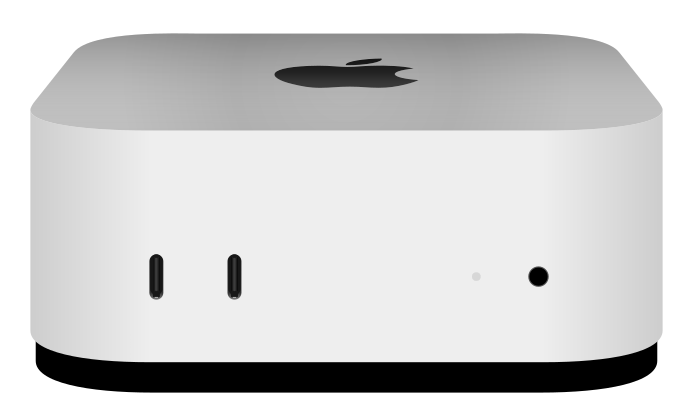 Your Hatched StackApple silicon · business AI operating system
Example workflowsSales12 new leads researched and briefed MarketingNext campaign drafted, awaiting your approval Operations3 issues flagged for review DevelopmentRelease tested and ready for approval 01 / SYSTEM FIRST MILESTONEOne workflow in production, measured against the numbers you have today. 01 02 03 04 Sales Marketing Operations Development Content generation Data processing 01 02 03 04

Concept1
Hatch Your StackConcept 08 · Motion study C
For businesses ready to own their AI system, not rent another seat
Your business AI operating system, running on a machine you control.
Your Hatched Stack runs on a dedicated Apple silicon machine owned by your business, not someone else's cloud. We begin with one recurring workflow and measure the result against the numbers you have today.
See how your business context, approved tools, systems, and rules flow through Your Hatched Stack to produce work your team can review and approve.
Your Hatched StackApple silicon · business AI operating systemResilient memoryRuns on your scheduleRight model for each taskCan run fully localGets better with use
Your hardwareYour dataYour approvalFull activity log
More than another AI chat tool
Most AI tools stop at answers. Your Hatched Stack gets approved work done.
Chat tools start over with every session. Your Hatched Stack keeps your business context, connects the tools your team already uses, and carries approved work from the first input to a finished result.
Often inside 30 days. We commit to a date once we have seen the scope and the access, not before.
02 / FOUNDATION
What your business gets
Built around your business. Controlled by your team.
Four essentials that turn AI from a chat tool into a working business system.
AI infrastructure you own
Your Hatched Stack runs on a dedicated Apple silicon machine owned by your business. It is not rented by the seat or trapped in someone else's cloud.
Built around your business
Your offers, customers, policies, and approval rules stay organized so every workflow works from your business context instead of generic internet answers.
Your tools, working together
Your CRM, email, files, calendar, models, and tools work together without your team copying information between tabs.
You stay in control
You choose the actions that need approval and set spending limits, review steps, and sign-off rules before the workflow runs.
03 / WORKFLOWS
Agentic workflows for the work you already do
Start with one workflow. Prove the value. Expand with confidence.
Choose a high-value recurring process. We measure today's baseline, build the workflow, and add more only after the result is clear.
Move every lead forward
Research and qualify leads, enrich CRM records, prepare account briefs, draft personalized follow-up, and surface stalled opportunities.
Plan and coordinate campaigns
Turn campaign goals into briefs, audience plans, channel-ready assets, performance summaries, and clear next steps.
Make recurring work run better
Monitor recurring processes, coordinate handoffs, route exceptions, check quality, and keep operating guides up to date.
Build and improve systems faster
Plan, build, test, and prepare websites, applications, and business tools for release.
Create from your business knowledge
Create and publish articles, campaign assets, sales materials, reports, and video content from your approved sources, brand voice, and review rules.
Turn documents and records into action
Extract, clean, classify, reconcile, and summarize documents and records, then send each result to the tools your team already uses.
04 / DELIVERY
A clear path to production
Build agentic workflows to keep your business moving.
Your current process stays in place while we build, test, and prove the new workflow. You decide when it goes live.
Choose the first workflow
Start with work your team repeats often, with a clear owner and a measurable cost in time or money.
Build without disruption
We configure your machine, business context, connected tools, and approval rules while your team keeps working as usual.
Prove it side by side
Run the new workflow alongside the current one and compare speed, cost, and quality before anything changes.
Approve the launch
Review the results and controls, then decide when the workflow is ready for production.
05 / CONTROL
Your system. Your rules.
Control the hardware your company runs on.
Your core operating data stays on your machine. You control the accounts, permissions, and approval rules, and your stack is not tied to a per-seat AI subscription. If we stop working together, the hardware, documentation, and configured workflows stay with your business.
For qualifying workflows, processing can remain on your hardware so model calls do not leave your environment.
01Accounts owned by your business
02Clear model and tool choices
03Data boundaries for each workflow
04Encrypted access credentials
05Approval steps you define
06Complete activity history
07Documented backup and recovery
08Local processing when the workflow qualifies
06 / START
Your first production stack
Put your first agentic workflow into production, starting at $9,997.
The Hatched Launch Stack includes the dedicated machine, setup, and your first production workflow. Compare higher-capacity and fully local configurations on the pricing page.
See configurations and pricingStarting at$9,997Hatched Launch Stack
- Dedicated AI operating system for your business
- Your business knowledge organized for action
- One production-ready agentic workflow
- Connections to your approved models and tools
- Human approvals and exception handling
- Testing, documentation, team training, and launch support
Final scope, timing, access requirements, and support are confirmed after your consultation. Model usage, third-party subscriptions, advertising spend, and ongoing maintenance are separate unless included in your proposal.
07 / FAQ
Clear answers before you commit
Questions businesses ask before hatching their stack.
Understand the hardware, ownership, data paths, production process, and costs before you choose a configuration.
What exactly is a Hatched Stack?
A dedicated AI operating system for your business, built around your real workflows and running on a machine you control. It combines your organized business knowledge, task-appropriate model routing, and a multi-agent layer with defined roles, approvals, and exception handling in one governed system rather than a collection of separate tools.
How is this different from a ChatGPT or Copilot subscription?
A subscription gives each employee the same general assistant, without a shared memory of how your business actually runs. A Hatched Stack is configured around a workflow you select, works from your approved company context, and runs on hardware you own. You are commissioning a system built for your process instead of renting another general-purpose seat.
Who is this built for?
Operators with at least one recurring workflow that has a measurable baseline, a clear owner, and enough volume that improving it matters. Launch suits businesses starting with one workflow; Pro and Max provide more capacity and room to expand; Ultra is for qualified workflows that must run entirely on local models.
Do I need a technical team to run it?
No. Your accepted scope defines access, documentation, training, and support before implementation begins. You will need to name a workflow owner, meaning someone who understands the process today and can approve how it should work afterward.
What hardware is included, and do I own it?
A dedicated machine sized to the workload: Launch includes a Mac mini with 16 GB memory and 512 GB storage; Pro includes 24 GB and 1 TB; Max includes 48 GB and 1 TB; and Ultra uses a Mac Studio selected after workload qualification. The machine is yours and runs in your environment. Additional specifications are available on request.
Where does the machine live, and what does it need?
With you, on your network and power. It needs a reliable internet connection, uninterrupted power, and a place where it can stay on continuously so approved workflows remain available rather than starting only on demand.
What happens if the hardware fails?
Every accepted build includes backups, recovery documentation, and defined rollback paths, so a failure is a restore rather than a rebuild from nothing. The machine carries Apple’s manufacturer warranty, and repair or replacement runs through Apple’s service process. Our target is to return you to a working system within 30 days.
Where does my business data live?
Your business context lives on your machine. What leaves it depends on the configuration you accept: cloud-first configurations route certain tasks to approved external AI models, and those processing paths are disclosed in the scope before you approve them.
Is my data used to train AI models?
Hatched Stacks does not use your business data to train its own models. When a workflow routes a request to an external provider, that provider’s terms govern the request. Your scope names the approved models and documents each processing path so you can see where data goes before you approve it.
Can it run entirely locally, with nothing sent to cloud providers?
That is what Ultra is designed for: approved workflows running on local models, with workflow-specific data boundaries and documented processing paths. Because local processing has real capacity limits, Ultra begins with workload qualification rather than a fixed machine specification.
Who owns the AI provider accounts and keys?
You do. Model routing uses customer-owned accounts, so the spending, provider terms, and ability to revoke access stay with your business. Account ownership is written into the accepted scope.
Why does every build start with only one workflow?
Because one workflow taken properly into production is worth more than five taken halfway. A single workflow gives you a measurable baseline, a clear owner, a safe path to production, and evidence before you expand the system.
What is shadow mode?
The new workflow runs alongside your existing process without replacing it or receiving production authority. It is tested against real conditions while your current process continues untouched, so nothing depends on it until it has earned your approval.
How do you decide it is ready for production?
By comparing it with the baseline agreed at the start, such as cycle time, throughput, cost per task, quality, or conversion, and checking it against the acceptance tests. It moves to production only when the workflow owner accepts its controls, exceptions, evidence, and rollback path.
What happens when the system gets something wrong?
The operating layer includes checkpoints, approvals, and exception handling. Decisions that must remain human-approved are identified during observation and kept that way. Activity records make errors traceable, and defined rollback paths make approved changes reversible.
How many tools can a Hatched Stack connect to?
There is no platform limit on tool connections. Your accepted scope includes the tools required for the workflow being built, and additional tools can be connected as your workflows expand.
What is included in the price?
The dedicated machine, one workflow taken through the full production process, your organized business context, approved model routing, human approvals, activity records, and recovery documentation. It also includes permissions, spending controls, health checks, logs, backups, and rollback paths.
Are there ongoing costs after the build?
Yes, and you control them directly. External model usage is billed to your own provider accounts, so you can see and cap that spending rather than paying a hidden margin. Local-model workflows do not incur model-token charges. Electricity, network service, and any approved third-party subscriptions are separate running costs.
What is the first step? Do I pay to get started?
No. The next step is a short qualification application, not payment. Final configuration, scope, success measures, and purchasing terms are confirmed after consultation, so you know what is being built before anything is committed. From accepted scope, a typical first workflow is running within 30 days.
What if I want to add workflows later, or stop working with you?
Each additional workflow receives its own scope, baseline, and success measures. If you stop working with us, you keep the machine, customer-owned accounts, documentation, and completed workflow. Continuity is defined in the scope so leaving is not a cliff edge.
Hatched Stacks
Your complete AI operating system that learns and grows with you.
Tell us where repetitive work slows your team down. We will show you whether it is a strong first workflow and what it would take to put it into production.
Hatch Your Stack